
I Spent a Day Testing Beaver Builder AI 1.0
I expected Beaver Builder AI to be good at generating pages and sections. It is.
What I didn’t expect was how quickly page generation would become the least interesting part of the test.
I spent a day working with Beaver Builder AI 1.0 on HYPEsites, my existing production WordPress site. This wasn’t a blank installation built for an AI demo. The site already had a visual language, established page patterns, reusable components, real business positioning, and years of Beaver Builder decisions behind it.
I started by letting Beaver Builder AI analyze that existing site and create a Design System. From there, I asked it to solve communication problems rather than giving it layouts to reproduce. I turned one of its better ideas into a reusable Component, modified the Component master, and watched the linked instance update. I exported the Design System, gave it to Claude outside WordPress, brought Claude’s work back into Beaver Builder, and then connected Claude directly to the site through MCP.
By that point, I was no longer particularly interested in whether AI could generate a nice-looking section. It clearly could.
So I gave it a harder test.
I took an existing HYPEsites case study for SDG Legal, a commercial property tax law firm, and asked Beaver Builder AI to redesign it using the site’s new Design System while preserving the underlying facts and evidence. The original page contained a lot of material: the business challenge, migration strategy, search architecture, rankings across six Ohio markets, service-specific results, traffic data, screenshots, a client testimonial, and longer-term expectations.
The finished AI-designed page is better than the migration I probably would have built myself.
That doesn’t mean the process went smoothly.
The finished page hides a series of failures involving assets, page state, long-running operations and writes that didn’t always persist. Getting from the original page to the version I ultimately published required considerably more supervision than the final result suggests.
Yet the same system was remarkably capable when I asked it to inspect its own work, operate in smaller steps and work within explicit safeguards.
That combination is what makes Beaver Builder AI 1.0 interesting.
The important question isn’t whether AI can build a WordPress page. It can.
The more interesting question is what happens when a mature page builder becomes something that humans and multiple AI agents can understand, build against, inspect, and maintain together.
After a day of testing, I think that’s the much bigger story.
I Didn’t Start with a Blank Website
Most AI website demonstrations begin with an empty page and a prompt.
That wasn’t particularly interesting to me.
HYPEsites was already a functioning Beaver Builder site with an established visual language and a specific point of view about how website projects should be approached. I wasn’t looking for AI to invent another design direction. I wanted to know whether it could understand the one that was already there and work within it.
So one of my first experiments was to let Beaver Builder AI analyze the existing site and create a Design System from what it found.
The result was surprisingly close.
It identified the Newsreader and Inter typography, warm off-white backgrounds, deep charcoal text, restrained gold accents, narrow border radius, generous whitespace, content widths, responsive type scales, and a fairly extensive spacing system. The resulting HYPEsites Editorial Design System contained 47 tokens covering colors, typography, spacing, widths, line heights, letter spacing, transitions, and other recurring values.
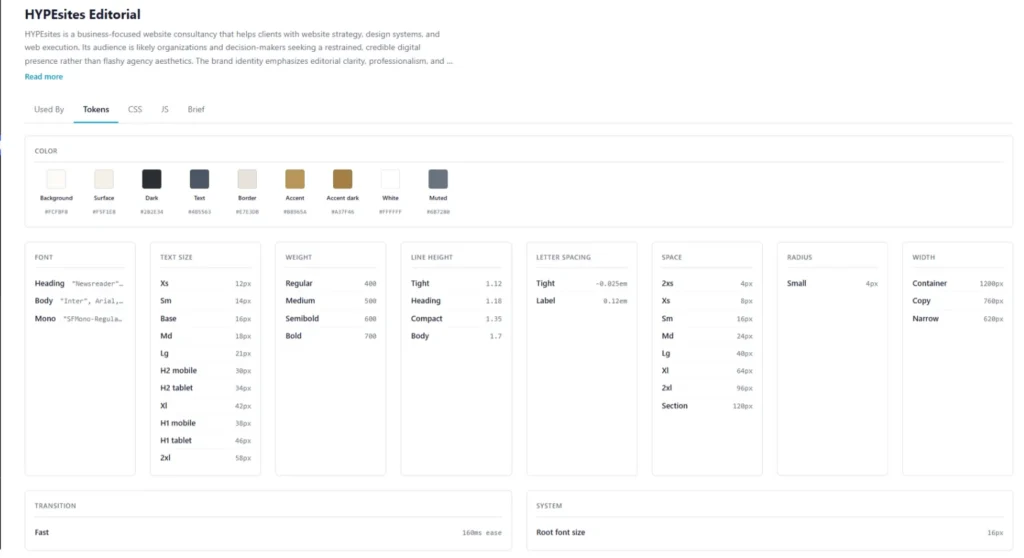
Visually, it understood the site very well.
Its first attempt at understanding the business was less successful.
The Brief it generated described HYPEsites this way:
AI-generated Brief
HYPEsites is a business-focused website consultancy that helps clients with website strategy, design systems, and web execution. Its audience is likely organizations and decision-makers seeking a restrained, credible digital presence rather than flashy agency aesthetics. The brand identity emphasizes editorial clarity, professionalism, and practical sophistication, with values centered on restraint, warmth, readability, and a calm, trustworthy presentation.
There’s nothing particularly wrong with that description. In fact, as an inference from the website, it’s pretty good.
But it describes what HYPEsites looks like and does, not really how I think about the work.
That distinction matters if the Design System is going to guide an AI agent making decisions rather than simply supply colors and fonts.
So I replaced the inferred business context with something the AI couldn’t reasonably discover by analyzing CSS and existing pages:
The business context I gave Beaver Builder AI
HYPEsites is a website strategy, design and development practice led by Chris Smith. It works with businesses that need to make a meaningful decision about what their website should do before deciding what to build.
The central principle is that a new website rarely solves a business problem by itself. It solves the right business problem when the project is defined correctly.
HYPEsites begins by understanding the business, defining the project, and only then moving into design and development.
Understand the business → Define the project → Design → Build → Refine
HYPEsites is not a conventional high-volume web agency and should never present itself like one. The work is informed by decades of experience building and operating businesses, leading web development, and building more than 650 websites. The perspective is that of a business operator who also builds websites, not a designer trying to sell design.
The primary audience is business owners and decision-makers considering a meaningful website project, including website rebuilds, ecommerce projects and situations where the existing website no longer supports what the business needs to accomplish.
Content should improve the reader’s decision rather than simply attempt to close a sale. Messaging should be specific, grounded and useful. Avoid generic agency claims, exaggerated marketing language, unnecessary jargon and aesthetic-first reasoning.
A recurring HYPEsites principle is: “Once you’ve defined the wrong project, every proposal is pricing the wrong solution.”
Another is that businesses often outgrow the way their website supports the business, not necessarily the website itself.
The visual system should support this philosophy. Design exists to create hierarchy, clarity and confidence around substantial ideas. It should never become the subject of the page unless design itself is being discussed.
I left Beaver Builder AI’s detailed Creative Direction in place. It had correctly identified the site’s editorial character, typography, palette, whitespace, grid behavior, restrained interaction patterns, responsive approach, and preference for structure over decoration. There was little reason for me to rewrite a visual analysis that was already doing its job.
This created an important distinction inside the same Design System.
AI inferred the design system. I defined the business system.
That became more important as the testing continued. Colors, typography and spacing could constrain how something looked. The Brief could influence what the AI believed the page was supposed to accomplish.
The next question was whether it actually would.
So instead of asking Beaver Builder AI to make me a particular layout, I gave it a business communication problem and let it decide what to design.
I Gave It a Business Problem, Not a Layout
With the Design System in place, I wanted to see how much design direction Beaver Builder AI actually needed.
I could have asked for a three-column section, specified a heading on the left, described the spacing, and told it where to use the gold accent. But that would mostly test whether AI could follow my design instructions.
I wanted to test whether it could make the design decisions itself.
So I created a blank test page, assigned the HYPEsites Editorial Design System, and gave Beaver Builder AI this prompt:
Create a new section for HYPEsites that helps a business owner recognize when their existing website has become a constraint on the business.
Situations:
- The business changed
- The website creates work
- The next decision is unclear
Conclusion: “A website becomes a problem when the business has to work around it.”
That was essentially the entire design brief.
I didn’t tell it to use cards. I didn’t ask for columns. I didn’t specify a background, typography treatment, numbering system, dividers, or responsive behavior. I described the communication problem and supplied the ideas the section needed to communicate.
What Beaver Builder AI produced was considerably more thoughtful than a literal rendering of the prompt.
It created an editorial diagnostic section with the eyebrow “When the website stops supporting the business” and reframed the main idea with the heading:
The issue may not be the website itself. It may be what the business now needs from it.
The three situations became numbered diagnostic signals rather than generic feature blocks:
01 — A change in direction
The business changed.
02 — A drag on operations
The website creates work.
03 — A project not yet defined
The next decision is unclear.
It separated the situations with restrained rules and finished with the conclusion as a larger editorial statement rather than another block of body copy.
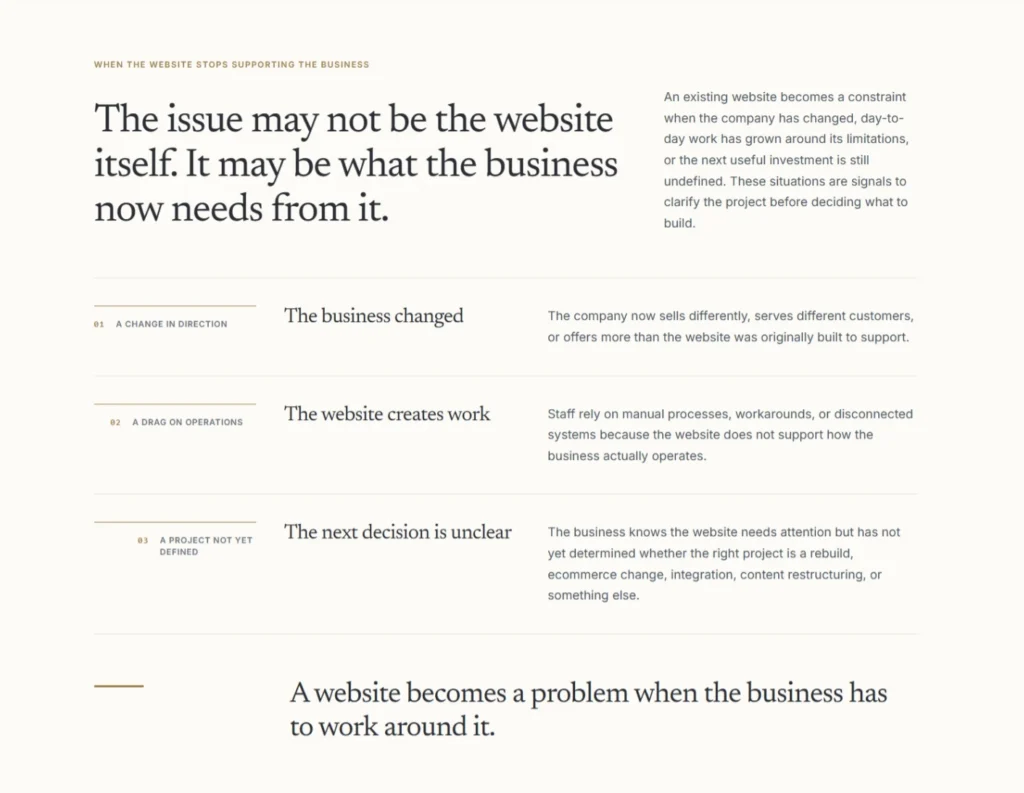
I supplied the business problem and three situations. Beaver Builder AI decided how to turn them into an editorial diagnostic section using the HYPEsites Design System.
This was the point where the test became more interesting to me.
The section didn’t look like AI had searched a library for a vaguely appropriate three-card component. It interpreted the relationship between the ideas and created a composition for them.
It also created more than rendered HTML.
The generated Custom – Website Constraint Diagnostic module exposed meaningful editing controls for the eyebrow, title, introduction and conclusion. The three situations were stored in a repeater, with each item containing fields for the variation, number, signal, title and description.
In other words, the AI had created a small content model for the idea it had just designed.
That distinction matters in a page builder.
Generating a visually impressive section is useful. Generating one that remains understandable and editable after the AI leaves is much more useful.
Then I turned the generated section into a Component
The generated section was good enough that I wanted to see what happened when it stopped being a one-off AI creation and became part of the site’s reusable design vocabulary.
I saved Custom – Website Constraint Diagnostic as a Beaver Builder Component and exposed the fields I wanted editable at the instance level.
Then I asked Beaver Builder AI to modify the Component master. The change was deliberately small: on larger screens, progressively indent the marker rail for situations 02 and 03 and add a short token-colored rule above each marker. On tablet and mobile, preserve the original straight layout.
The staircase treatment visible in the screenshot above is the result.
I published the Component master and refreshed the original test page. The linked instance inherited the change automatically, while its content fields and responsive behavior remained intact.
That was a more consequential result than generating the section in the first place.
The workflow had moved from:
Prompt → generated design
to:
Business requirement → generated design → semantic editing model → approved Component → controlled master revision → inherited update
At that point, Beaver Builder AI wasn’t just helping create a page. It was participating in the maintenance of a design system.
There was also an important limitation.
During another test, I asked Chat to reuse an existing saved Component. Visually, it appeared to do exactly that. When I inspected the resulting architecture through MCP, however, I found that it had recreated the design as a standalone Custom Module rather than inserting a true linked instance of the saved Component.
I couldn’t find a supported operation in either Chat or MCP that would insert an existing saved Component as a genuinely linked instance with instance-level overrides.
For me, that’s one of the clearest gaps in version 1.0.
If Components are the approved vocabulary of a mature Beaver Builder site, AI needs to be able to say, in effect, “insert this existing Component here and change only these exposed fields.”
It can create the vocabulary. It can modify the master. Linked instances correctly inherit those master changes.
What it couldn’t yet reliably do in my testing was reach into the existing vocabulary and place a new linked instance on demand.
That distinction would become important again when I connected an external AI agent to the site.
I Took the Design System Outside WordPress
The next test was designed to answer a different question.
If Beaver Builder’s Design System was really becoming the shared language of the site, could another AI work with that language without having access to WordPress or Beaver Builder at all?
Beaver Builder AI can export a Design System as a Design Kit. I exported the HYPEsites Editorial system and gave the resulting files to Claude.
For this test, Claude had no MCP connection and no access to WordPress. It received only the exported Design Kit.
The kit contained the design tokens, CSS, business and creative direction, formatting instructions, and other information needed to describe how the HYPEsites system should be used.
Then I gave Claude a simple assignment: create a new HYPEsites section using that kit.
Claude produced a section titled:
The Cost of Starting With the Website
It used the HYPEsites typography, restrained gold accent, editorial spacing and overall visual language, but it didn’t simply reproduce the Website Constraint Diagnostic or another existing section. It created a new composition.
That was exactly what I wanted to see.
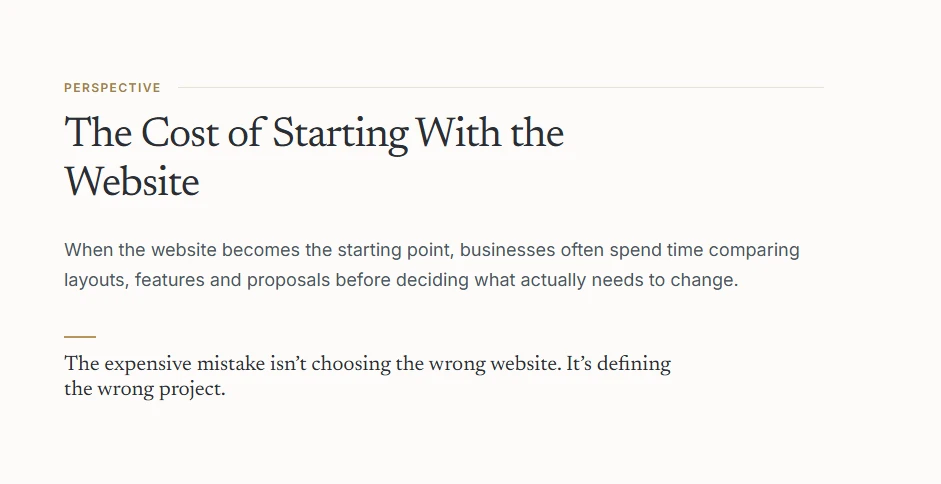
The more interesting part came when I brought the work back.
I imported Claude’s output into Beaver Builder. During the import, Beaver Builder recognized that the work matched the existing HYPEsites Editorial Design System and offered to link it to that system rather than create another one.
The imported section became an editable Custom – Perspective Insight module with controls for its content.
So the round trip looked like this:
Beaver Builder Design System → exported Design Kit → external AI → generated section → Beaver Builder import → existing Design System → editable Custom Module
No WordPress connection was required while Claude was creating the section.
That suggests a much broader role for Design Kits than simply moving styles between Beaver Builder installations.
They can function as a contract between the site and an external agent.
The AI doesn’t need to remember what HYPEsites looks like. It doesn’t need a screenshot of an existing page and instructions to “make something like this.” The system itself can travel with the assignment.
The Design System controls the language. The Custom Module controls the sentence.
That became my shorthand for what I was seeing.
The Design System establishes the vocabulary: typography, colors, spacing, widths, visual behavior and, importantly, the business and creative guidance behind them.
The external AI can then compose something new within that vocabulary.
When the result returns to Beaver Builder as a Custom Module, it becomes a specific, editable expression of the system rather than a flattened artifact.
There was another detail I wanted to verify.
I compared the Design Kit files before and after Claude worked with them. Claude hadn’t rewritten the original system to accommodate what it wanted to build. The original kit files remained unchanged. It added the new page against the existing contract.
That matters if Design Kits are going to be used across agents or workflows. A portable design system is considerably more useful if an agent can build against it without quietly redefining it.
At this point, I had tested Beaver Builder AI working inside the editor and Claude working outside WordPress from an exported system.
The obvious next step was to remove that separation entirely.
I connected Claude directly to Beaver Builder through MCP.
MCP Changed the Nature of the Experiment
Connecting Claude directly to Beaver Builder through MCP was where the experiment stopped feeling primarily like AI-assisted page building.
MCP, or Model Context Protocol, gave Claude access to a set of Beaver Builder and WordPress operations called abilities. Instead of looking at the rendered HYPEsites website and trying to infer what was behind it, Claude could inspect the actual structure.
It could list Design Systems and saved templates. It could inspect a page and identify individual rows, columns and modules. It could distinguish native Beaver Builder modules from AI-generated Custom Modules. It could examine Component masters and linked instances. It could read Design System tokens and guidance. It could also perform supported write operations.
That made Claude useful for something quite different from generating a section.
It could audit the site.
For example, I asked it to examine the reusable elements already present on HYPEsites. It found 19 saved templates: 12 were Components and seven were conventional saved templates. It could identify which Components contained other Components and trace the relationship between a Component master and an instance on a page.
That level of visibility also caught something Beaver Builder Chat had made very difficult to see.
Earlier, I had asked Chat to reuse an existing Component. The result looked right on the page. Through MCP, Claude could inspect the underlying node and determine that Chat had actually recreated the appearance as a standalone Custom Module rather than inserting a linked instance of the Component.
Visually, those two outcomes can be almost indistinguishable.
Architecturally, they’re not the same thing at all.
That is where MCP started to make sense to me. An external agent doesn’t have to be another designer. It can act more like an architectural layer over the site, checking whether what appears correct in the browser is also constructed correctly underneath.
I changed one Design System token to see what would happen
I wanted to know whether Beaver Builder’s Design System was simply information supplied to AI during generation or whether the generated work remained connected to it afterward.
So I ran a deliberately obvious test.
The HYPEsites Design System uses a restrained gold as its primary accent:
#B8965A
Through MCP, Claude changed only that Design System token to bright blue:
#0066FF
Before making the change, it retrieved the current Design System and its content hash. The update operation required that current hash, which provides protection against blindly overwriting a system that may have changed since it was last read.
Then I refreshed the test page.
One element immediately turned blue.
Another didn’t.
At first glance, that could look like inconsistent Design System behavior. Inspection showed exactly the opposite.
The element that changed was explicitly using:
var(--ds-color-accent)
The Website Constraint Diagnostic used:
var(--ds-color-accent-dark)
So it correctly remained gold.
The generated modules weren’t merely approximating the Design System’s colors. They were responding to the specific semantic tokens they had been built against.
Claude then changed the accent token back to #B8965A.
The Design System’s resulting content hash returned to exactly the same value it had before the experiment.
Nothing else had changed.
That test answered an important question for me.
The Design System wasn’t just generation context.
It was live runtime infrastructure.
An AI-generated Custom Module could remain connected to the same semantic design decisions that governed other work. And an external agent could inspect and administer those decisions centrally rather than opening individual modules and trying to make the same change repeatedly.
The safeguards were more interesting than unrestricted access
I was also paying attention to what Claude couldn’t casually do.
Some writes required current-state information such as the Design System content hash. Later, during the full-page test, deleting individual Beaver Builder rows required explicit human confirmation for each destructive operation.
Those safeguards occasionally slowed the experiment down, but I wouldn’t remove them.
Giving an AI agent site-wide access is only useful in production if the system can distinguish between reading, changing and destroying things.
MCP made Beaver Builder considerably more machine-operable.
The confirmation and state-checking mechanisms made that prospect considerably less reckless.
By this point, I had tested AI generating within the editor, an external AI working from the Design System without WordPress, and an external AI inspecting and changing the actual Beaver Builder architecture through MCP.
What I still hadn’t tested was the thing most people would probably try first:
Could I give Beaver Builder AI a real, complicated production page and let it redesign the whole thing?
That’s where the test got messy.
Then I Gave It a Real Production Page
Up to this point, most of my tests had been deliberately controlled.
A section is a relatively contained problem. Even the Component and Design Kit experiments involved a small number of elements with clearly defined boundaries.
A real website page is different.
For the next test, I chose an existing HYPEsites case study for SDG Legal, a commercial property tax law firm serving businesses across Ohio.
This was not placeholder content created for the experiment. It was a real production page containing the strategy and results from an actual client project.
The existing case study documented a Wix-to-WordPress migration, a new information architecture organized around markets and service lines, technical migration work, content strategy, indexing, rankings, traffic data, screenshots, competitive context, a client testimonial, and expectations for continued organic growth.
It was also exactly the kind of page I might eventually have migrated manually into the new HYPEsites design.
That made it a useful stress test.
I told AI what it couldn’t change
I made a duplicate of the production page for the experiment and gave Beaver Builder AI a fairly strict assignment.
It could redesign the presentation, hierarchy and composition using the HYPEsites Editorial Design System.
It could reorganize the material where that improved the story.
But it was not allowed to invent, remove or exaggerate factual claims. Existing images were supposed to be preserved rather than replaced. The production page itself was not to be modified.
I wanted to separate two jobs:
The facts were mine. The presentation was AI’s.
Before building anything, Beaver Builder AI analyzed the source and proposed an editorial structure for the new page.
Its plan was good.
It wanted to lead with the outcome, establish the challenge, create a concise evidence snapshot, explain the strategy in five parts, move into detailed performance evidence, show the difference between location and service architecture, address the business implications, preserve the client testimonial, and finish with a restrained CTA.
That was a better narrative than simply reproducing the original page section by section.

Then it started building.
The design was better than I expected
The first major sections changed my expectations for the test.
Beaver Builder AI created an outcome-led hero, followed by a restrained Challenge section and a compact Results Snapshot. The Strategy section turned five fairly technical parts of the project into a long editorial sequence instead of five generic cards.
The ranking data was presented as evidence rather than simply displayed as data. Market-by-market results and service-specific rankings were given their own visual hierarchy. The two long screenshots showing an Akron location page and the Assessment Review service page became a side-by-side explanation of how the information architecture worked.
The page felt designed around the material.
It didn’t feel like the old case study had simply been poured into a new template.
After we finished the experiment, I replaced the original production case study with the AI-designed version.
I don’t make that decision lightly. I’ve been building websites for decades, and I know how I probably would have handled this migration myself.
I think Beaver Builder AI designed it better.
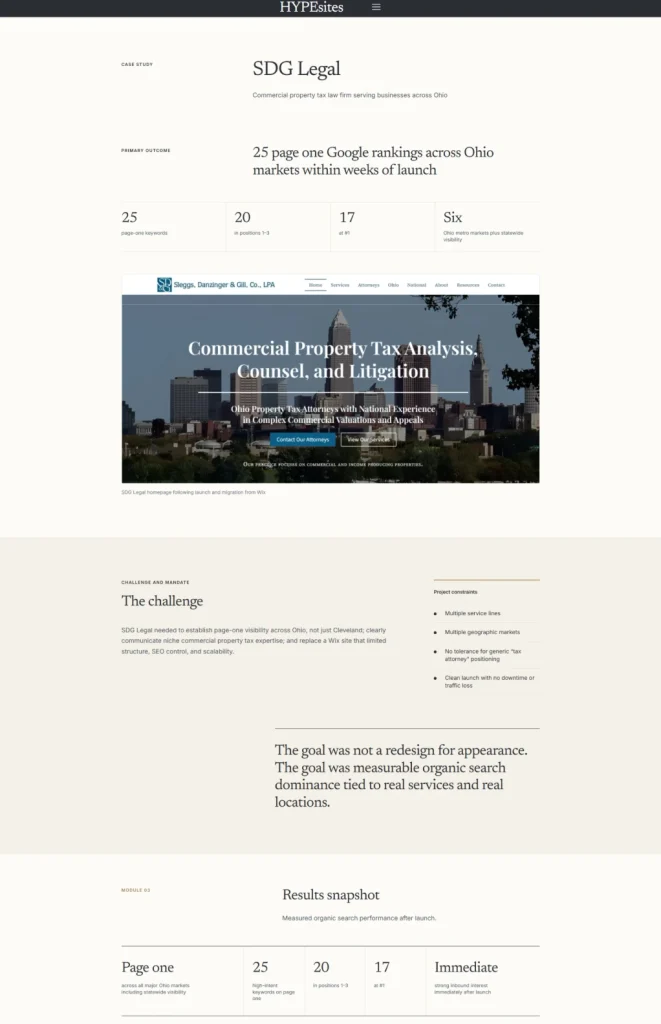
See the finished SDG Legal case study →
That is probably the strongest endorsement I can give the design side of Beaver Builder AI 1.0.
It is also only half the story.
The finished page hides what it took to get there
If I showed only the before-and-after screenshots, this would look like a nearly autonomous success.
It wasn’t.
The initial attempt to build the entire redesign in one operation timed out.
Breaking the work into batches helped, but another multi-module operation timed out as well. Eventually, building and modifying one module at a time proved substantially more reliable.
Some of the failures were more consequential than timeouts.
The AI inserted newly designed sections after old legacy content instead of where they belonged in the new narrative. It generated an incorrect hero image even though I had specifically instructed it not to replace existing imagery. It omitted the actual client quote from the testimonial treatment. A link was left pointing to #.
At one point it declared the redesign complete.
It wasn’t.
A read-only audit found two required sections missing, eight legacy rows still sitting between the redesigned sections, a duplicate thematic section, the placeholder link, and an unrelated image.
That was the moment the distinction between design intelligence and orchestration reliability became impossible to ignore.
The AI could plan the page extremely well.
It could design individual sections extremely well.
It was much less reliable at autonomously managing the long sequence of operations required to transform the old page into the finished one.
Auditing was more reliable than assuming
The recovery process became another experiment.
Instead of asking Beaver Builder AI to keep building, I increasingly asked it to inspect the actual page state first.
That worked much better.
It could identify the remaining legacy rows by node ID. It could determine which redesigned modules existed and which were missing. It could inspect links, assets and module content. Through MCP, I could independently verify much of the same architecture.
Deleting the old rows also exposed a safeguard I appreciated: each destructive operation required explicit human confirmation.
There was no “AI decided these eight things looked obsolete and deleted them” moment.
I had to approve the removals.
One mistake was mine. I allowed source material to be removed before rebuilding a missing Sustainability section. When I later asked AI to recreate it, it no longer had the source necessary to do so accurately.
It refused to invent the missing material.
I recovered the original text from the production page and supplied it again.
That is the kind of failure I want an AI system to have.
“Updates applied” did not always mean updates applied
The most persistent reliability problem appeared during final refinement.
Beaver Builder AI would sometimes report:
Updates applied — let me know if you’d like any adjustments.
But nothing visible had changed.
When challenged, it eventually acknowledged that the editor layer had skipped the write.
In another case, a multi-part CTA update partially persisted: the background and text colors changed, but the button did not.
Even explicitly instructing the AI to reread the module before reporting success did not completely eliminate false-positive completion messages.
That led to one of the clearest practical lessons from the entire test:
Write confirmation is not state verification.
For consequential changes, the reliable workflow became:
Make one change → reread the actual state → visually verify it → continue.
That sounds less impressive than “AI redesigned my website.”
It is also much more useful if you’re actually responsible for a production website.
The problems weren’t all AI reasoning problems
Extended sessions also exposed practical limits around the surrounding system.
I hit the maximum number of tool calls during the page work. Starting another conversational turn didn’t immediately resolve it, and I eventually had to start a fresh Chat session.
Later, my OpenAI API balance ran out in the middle of a styling operation. Beaver Builder AI uses my API key, so the work stopped until I added more API credit.
Those aren’t design failures, but they matter when evaluating the real workflow.
The final page is polished enough that none of this is visible to a visitor.
That’s precisely why I think the distinction matters.
Beaver Builder AI may already be better at designing a complex page than autonomously managing the entire production process required to build that page.
Or, more simply:
Its design intelligence is ahead of its orchestration reliability.
What Actually Worked Best
By the end of the SDG Legal rebuild, the workflow that worked best was clear:
Plan → Build a small piece → Verify the actual state → Continue → Audit the finished page
I was comfortable letting AI propose the editorial structure, decide how an individual section should communicate an idea, and build sophisticated Custom Modules with semantic fields, repeaters and responsive behavior.
What I stopped doing was assuming that a successful-looking sequence of tool calls meant the page was actually in the state either of us thought it was.
That isn’t autonomous website building. But for production work, it proved to be a powerful division of responsibility.
The editor also showed me when AI was working
There was a small interface detail I came to appreciate during this process.
While Beaver Builder AI was actively working on a module, the editor placed a lock icon over that module.
It’s a minor feature compared with Design Systems, Components or MCP, but it communicates something important: this object is currently being operated on.
That becomes more valuable as AI gains the ability to make increasingly consequential changes inside a visual editor. I don’t want an agent and a human unknowingly editing the same object at the same time.
The same principle showed up elsewhere in the system. Destructive removals required confirmation. Design System updates through MCP required current-state information. Component masters and linked instances were treated differently.
These aren’t the features that make the best demo videos.
They’re the features that make me more comfortable using AI on a production site.
What This Changes for an Experienced Beaver Builder User
There is an obvious way to look at Beaver Builder AI 1.0.
Someone without much web design experience can describe a page, combine that with a preconfigured Design System or Design Kit, and potentially produce something respectable much faster than they could have before.
That’s significant, but it isn’t the part that interests me most.
I’ve built more than 650 websites. I already know how to create rows, columns, responsive layouts, modules, CSS and reusable components in Beaver Builder.
The value to me isn’t that AI can now do something I couldn’t do.
It’s that it can compress a large amount of work I already know how to do.
The SDG Legal case study is a good example.
I could have migrated that page manually. I could have worked through the content, decided on a new hierarchy, designed each section, built it, adjusted the responsive behavior, and refined the spacing.
I probably would have produced a good page.
But after looking at the finished AI version, I think Beaver Builder AI made some design decisions I wouldn’t have made, and the result is better for them.
That’s a different value proposition from automation.
It’s closer to collaboration.
AI makes the beginning of the process more important, not less
My HYPEsites process has been:
Understand the business → Define the project → Design → Build → Refine
Most of the discussion around AI website builders focuses on what happens to Design and Build.
After this test, I think that’s backwards.
AI clearly compresses those stages. It can also accelerate Refine.
That makes Understand and Define more important.
When I told Beaver Builder AI what layout to create, I was mostly using it as a faster pair of hands.
When I told it what a business owner needed to understand and gave it a Design System containing the business context, it could contribute design ideas of its own.
The quality of the output became increasingly dependent on the quality of the decisions made before the page was built.
That’s why I don’t see MCP, Design Systems, Components and AI-generated modules as eliminating the role of an experienced website professional.
They shift where that experience has the most leverage.
Knowing how to make a three-column row becomes less valuable.
Knowing whether the page should have three columns in the first place becomes more valuable.
And knowing what the page needs to accomplish before anyone starts designing it becomes more valuable still.
My Assessment of Beaver Builder AI 1.0
After this testing, I’d rate Beaver Builder AI 1.0 9 out of 10.
That rating may seem high given how many problems I encountered during the SDG Legal rebuild.
I’m not giving it a 9 because every operation worked. Clearly, they didn’t.
I’m giving it a 9 because of what Beaver Builder appears to be building underneath the page-generation interface.
If this were simply an AI prompt box that generated attractive Beaver Builder pages, I wouldn’t rate it nearly as highly. There are already plenty of tools that can generate attractive web layouts.
What impressed me was the architecture connecting the different pieces.
Design Systems give AI a persistent visual and business context rather than requiring every prompt to explain the site again.
Custom Modules give AI enough freedom to create sophisticated compositions while still producing meaningful fields and repeaters that a human can edit afterward.
Components provide a governance layer where successful ideas can stop being one-off generations and become approved, reusable parts of the site.
Design Kits allow that system to travel outside WordPress so another AI can build against it without direct access to the website.
MCP makes the underlying Beaver Builder site inspectable and operable by external agents rather than limiting AI to what it can infer from a rendered page.
And native Beaver Builder modules remain available when deeper native integration is more important than the design freedom of a Custom Module.
Those pieces aren’t perfectly connected yet.
But they’re connected enough that I could see the shape of a very different workflow from simply prompting AI to make pages.
Where 1.0 still breaks down
The biggest issue from my testing is orchestration reliability.
Beaver Builder AI needs a more transactional relationship with the editor:
Read the current state → make the change → verify the stored state → report the result
During my testing, that loop wasn’t consistently reliable. A tool call could appear successful without the editor persisting the change. A multi-part operation could partially succeed. And the conversational response could report completion without independently establishing that the requested state had actually been reached.
For production work, that’s a more important problem than whether AI occasionally chooses the wrong font size.
The second major limitation is Component insertion. I could create Components, modify their masters and propagate changes to linked instances, but I couldn’t reliably ask Chat or MCP to insert a new linked instance of an existing Component. For a mature site with an approved Component library, that’s an important missing operation.
There are several smaller gaps as well.
AI-generated Custom Modules can expose excellent semantic editing controls and repeaters, but I couldn’t get them to expose the native field-registration layer required for Beaver Themer Field Connections. Native Beaver Builder modules still have an advantage when dynamic-data integration matters.
Design System administration was also more reliable through MCP than through the built-in Chat during my testing. And getting Claude connected through MCP was technical enough that I wouldn’t describe the current setup as something every Beaver Builder user will casually configure.
None of those issues changes my overall assessment.
They define what still separates a very strong 1.0 from the system I think this could become.
What would move it closer to 10
The improvements I’d most like to see are fairly specific:
- true insertion of existing linked Components through both Chat and MCP;
- transactional writes that verify actual editor state before reporting success;
- more reliable Design System administration directly from Beaver Builder Chat;
- a deeper bridge between AI-generated Custom Modules and Beaver Builder’s native dynamic-data and Themer capabilities;
- easier MCP configuration for external agents.
Solve those, and much of the supervision I needed during the SDG Legal rebuild disappears without sacrificing the safeguards I actually want to keep.
The Page Generation Isn’t the Interesting Part
I started this test expecting to evaluate an AI feature inside a page builder.
By the end of it, that description felt too small.
The breakthrough isn’t that AI can replace Beaver Builder.
It’s that Beaver Builder is becoming machine-readable and machine-operable.
A Design System can define the language. AI can explore within it. Custom Modules can turn those ideas into editable objects. Components can establish an approved vocabulary. Design Kits can carry the system outside WordPress. MCP can let external agents inspect and operate on the underlying architecture.
The human still has a critical role.
Someone has to understand the business. Someone has to define the problem worth solving. Someone has to decide which AI-generated ideas deserve to become part of the system. And, at least in version 1.0, someone still needs to verify that the operation the AI says it completed is the operation the editor actually stored.
That’s not a disappointment.
For me, it’s a much more useful model of AI-assisted website building than typing a prompt and hoping an autonomous agent produces a finished website.
The SDG Legal experiment made that particularly clear. Beaver Builder AI produced a page I ultimately preferred to the migration I probably would have designed myself.
It also needed me watching the process closely enough to get there.
That combination is why I’m giving Beaver Builder AI 1.0 a 9 out of 10.
And after spending a day testing it, generating the page may have been the least interesting thing it did.
Testing environment
This testing was conducted on an existing production WordPress site using Beaver Builder 2.11.0.4, Beaver Builder AI 1.0.0, and MCP Adapter 0.6.1. Beaver Builder AI Chat was connected to OpenAI using my own API key. Claude was connected separately through MCP for the external-agent tests.